





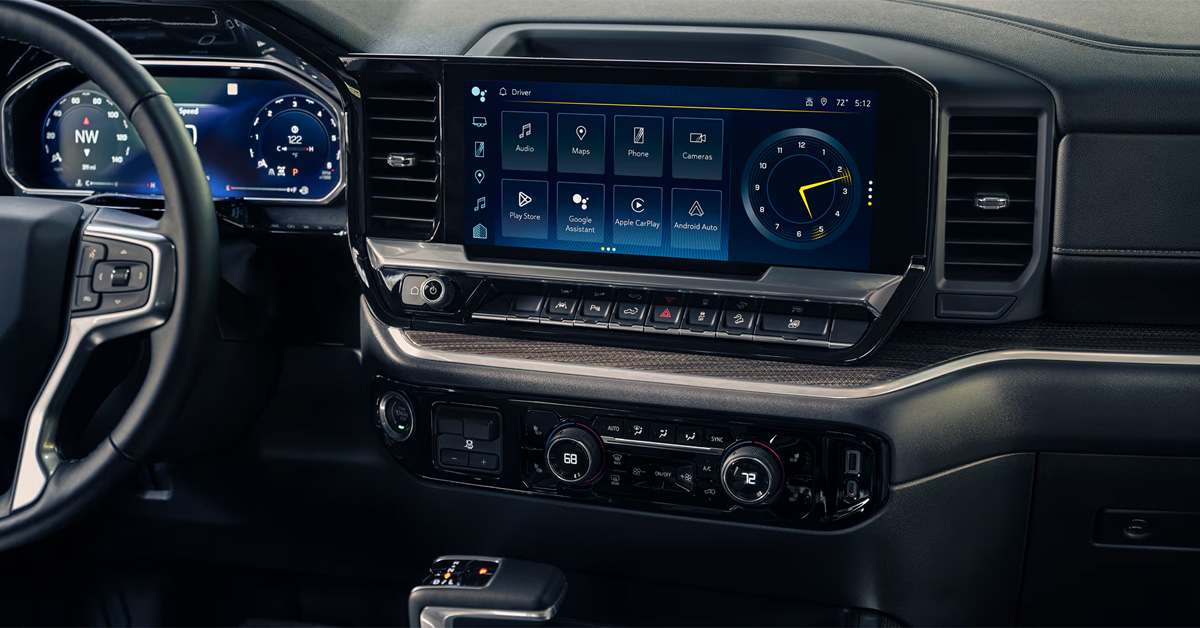
Modern Chevy infotainment systems are more advanced than ever, but even a small issue can lead to freezing screens, black displays, ghost touch behavior, or slow response times. The most common Chevy screen glitch causes in 2026 include software bugs, connectivity conflicts, power supply problems, touchscreen hardware wear, and heat-related stress. Identifying the root cause early can often help restore normal operation and prevent a minor inconvenience from becoming a larger repair.
At Gerry Raymond Chevrolet GMC, we are committed to helping drivers keep their vehicles performing at their best. Whether you need expert service, genuine Chevrolet and GMC parts, professional diagnostics, flexible financing solutions, or assistance finding your next Silverado 1500, Equinox, or Trailblazer, our team is here to help. Contact or visit Gerry Raymond Chevrolet GMC today to speak with our knowledgeable staff and get the support you need for every stage of vehicle ownership.
Reason #1: Software Glitches and System Bugs
One of the most common Chevy screen glitch causes 2026 drivers encounter is a software-related issue. Modern Chevrolet infotainment systems do far more than play music. They manage navigation, smartphone connectivity, vehicle settings, camera displays, voice commands, and much more. When software becomes outdated, overloaded, or encounters a temporary bug, the result can be a screen that freezes, lags, or behaves unpredictably.
Imagine starting your morning commute, connecting your phone, and pulling up navigation, only to find the display suddenly unresponsive. In many cases, the screen itself is not broken. Instead, the system may be struggling with a software error that prevents it from processing information correctly.
Common software-related symptoms include:
- Touchscreen delays or lagging responses
- Frozen menus or apps
- Unexpected system restarts
- Blank or black screens that later return to normal
- Bluetooth, Apple CarPlay, or Android Auto connection issues
- Missing icons or applications
These problems can affect many Chevrolet models, including the Silverado 1500, which relies heavily on advanced infotainment technology to keep drivers connected and informed on the road. As software systems become more sophisticated, occasional glitches can occur just like they do with smartphones, tablets, and computers.
What Can Drivers Try First?
Before assuming a major repair is needed, a few simple troubleshooting steps may resolve the issue:
- Perform a soft reset of the infotainment system.
- Turn the vehicle off, wait a minute, and restart it.
- Check for available software updates.
- Disconnect and reconnect paired mobile devices.
- Remove old Bluetooth connections that are no longer being used.
Software updates are especially important because manufacturers regularly release improvements that address bugs, improve compatibility with newer phones, and enhance overall system performance.
If your infotainment screen continues freezing, restarting, or displaying unusual behavior after basic troubleshooting, professional diagnostics may be necessary. The service team at Gerry Raymond Chevrolet GMC can inspect your system, install updates when needed, and identify whether the issue is software-related or part of a larger electrical concern. A quick diagnosis today can help prevent ongoing frustration and keep your Chevrolet technology working the way it was designed to.
Reason #2: Bluetooth, CarPlay, and Connectivity Conflicts
Not every infotainment problem originates from the screen itself. In many cases, what appears to be a Chevrolet infotainment screen not working issue is actually a communication problem between the vehicle and a connected device. Modern infotainment systems constantly exchange data with smartphones through Bluetooth, Apple CarPlay, and Android Auto. When that connection becomes unstable, the entire system can struggle to keep up.
For example, an Equinox owner may notice that the screen freezes only when navigation is running through a smartphone. Another driver might experience audio interruptions, delayed touch responses, or apps that suddenly disconnect during a trip. These situations can be frustrating, especially when everything seemed to work perfectly the day before.
How Connectivity Issues Create Screen Problems
Infotainment systems process large amounts of information at once. Music streaming, phone calls, navigation directions, text message notifications, and vehicle functions may all be operating simultaneously.
When conflicts occur, drivers may experience:
- Frozen or lagging screens
- Delayed touchscreen responses
- Apple CarPlay or Android Auto is disconnecting unexpectedly
- Bluetooth pairing failures
- Missing audio during calls or music playback
- Navigation apps that stop responding
In some cases, a recent smartphone update can create compatibility issues. A damaged USB cable or overloaded Bluetooth memory can also interfere with communication between the vehicle and the connected device.
Simple Troubleshooting Steps to Try
Before scheduling service, consider these basic solutions:
- Delete and reconnect your phone’s Bluetooth connection.
- Restart both your phone and the vehicle.
- Use a high-quality USB cable if connecting through Apple CarPlay or Android Auto.
- Remove old devices that are no longer paired regularly.
- Check for software updates on both the phone and the infotainment system.
These steps often resolve intermittent issues that seem much larger than they actually are.
When Connectivity Problems Keep Returning
If connection issues happen repeatedly, even after re-pairing devices and updating software, there may be a deeper problem involving the infotainment system’s hardware or software configuration. Persistent freezing, repeated disconnections, or ongoing performance issues should be inspected by trained technicians who can accurately diagnose the source of the problem.
At Gerry Raymond Chevrolet GMC, our service team can help identify whether connectivity conflicts, software concerns, or another underlying issue is affecting your infotainment system. A professional inspection can save time, reduce frustration, and help restore the seamless technology experience Chevrolet drivers expect from their vehicles.
Reason #3: Power Supply Problems
Sometimes the screen is not the problem at all. One of the less obvious causes of infotainment issues is an interruption in the vehicle’s electrical system. Modern Chevrolet vehicles rely on a steady flow of power to operate everything from the touchscreen and audio system to safety features and vehicle settings. When that power becomes inconsistent, the infotainment system can begin acting unpredictably.
A driver may start their vehicle one morning and notice the screen stays black for several seconds before finally turning on. Another may see the display randomly restart while driving. These situations can feel like major system failures, but they are often tied to something much simpler, such as battery voltage fluctuations or a failing fuse.
How Electrical Issues Affect the Infotainment System
The infotainment system depends on clean, consistent power. Even small interruptions can cause software errors, delayed startup times, or complete screen shutdowns.
Common signs of a power-related issue include:
- A touchscreen that remains black after startup
- Random screen resets while driving
- Delayed infotainment system loading
- Features that work intermittently
- A system that shuts off unexpectedly and then restarts
- Multiple electronic features are behaving unusually at the same time
Many drivers searching for Chevy touchscreen problems and fixes are surprised to learn that the root cause may be electrical rather than software-related.
What Could Be Causing the Power Problem?
Several components can affect the amount of power reaching the infotainment system:
- A weak or aging battery
- A blown infotainment fuse
- Corroded battery terminals
- Loose wiring connections behind the dashboard
- Faulty grounding points within the electrical system
For example, a Trailblazer with a battery nearing the end of its service life may still start and drive normally while occasionally experiencing electronic glitches. Because infotainment systems are sensitive to voltage fluctuations, even minor electrical inconsistencies can trigger noticeable screen problems.
Basic Checks Before Scheduling Service
If you suspect an electrical issue, consider these simple inspections:
- Check whether the battery is older or showing signs of weakness.
- Look for warning lights related to the charging system.
- Inspect battery terminals for corrosion.
- Review whether any recent electrical accessories or repairs were installed.
- Verify that the appropriate infotainment fuse has not failed.
While some checks are straightforward, diagnosing deeper electrical concerns often requires specialized equipment.
If your touchscreen continues shutting off, restarting, or behaving inconsistently, the service professionals at Gerry Raymond Chevrolet GMC can perform a comprehensive electrical system inspection. Identifying a power supply issue early can help prevent additional electronic problems and keep your Chevrolet’s technology operating reliably every time you get behind the wheel.
Reason #4: Touchscreen Digitizer or Display Failure
If you’ve ever wondered why my Chevy display is freezing, the issue may be related to the touchscreen digitizer or the display layer itself. The digitizer is the part of the screen that senses touch input, translating your taps and swipes into commands for the system. When this component begins to fail, the screen may respond incorrectly, register phantom touches, or stop responding altogether.
Silverado 1500 owners, in particular, may notice occasional ghost touch, dead spots, or delayed response in areas of the screen that are used most frequently. These issues often appear gradually and worsen over time, creating frustration during everyday driving or while using navigation and media features.
Common Signs of Digitizer or Display Failure
- The screen activates on its own or registers touches incorrectly
- Certain areas of the screen do not respond at all
- Volume changes or app openings happen without input
- Screen freezes intermittently despite software resets
- A clear image is displayed, but touch functionality is inconsistent
These symptoms indicate that the problem is not software or connectivity but hardware-related, specifically the layer that senses touch. Environmental factors, long-term wear, or physical damage can accelerate digitizer degradation.
Why the Digitizer Fails
- Heat Exposure: High dashboard temperatures, especially on sunny days, can warp or weaken the screen layers.
- Delamination: Over time, layers of the screen may begin to separate, reducing touch accuracy.
- Normal Wear and Tear: Repeated daily use gradually wears down the sensitive touch layer, particularly in frequently used areas.
What Drivers Can Do
While minor glitches can sometimes be temporarily managed with a reset, hardware issues usually require professional attention. Repairing or replacing the digitizer restores accurate touch response without needing to replace the entire infotainment system.
At Gerry Raymond Chevrolet GMC, our certified technicians can diagnose whether your Silverado 1500’s screen issues are due to the digitizer or other components. We provide expert touchscreen repairs and display replacements to get your system back to reliable operation. Schedule a visit today to ensure your Chevrolet stays connected and responsive on every drive.
Reason #5: Heat Exposure and Environmental Stress
Modern infotainment systems are built to handle a wide range of driving conditions, but extreme temperatures can still take a toll on sensitive electronics. Heat exposure is one of the most overlooked causes of screen glitches, especially during the warmer months when vehicle interiors can reach temperatures far above the outside air temperature.
Many drivers notice that their infotainment screen works normally in the morning but begins lagging, flickering, or freezing after the vehicle has been sitting in direct sunlight. An Equinox parked outdoors for several hours may experience temporary performance issues simply because the dashboard and infotainment components have become excessively hot.
How Heat Affects Your Infotainment System
Electronic components generate heat during normal operation. When high cabin temperatures are added to the equation, the system may struggle to perform efficiently.
Common heat-related symptoms include:
- Slow touchscreen response
- Temporary screen freezing
- Flickering displays
- Black screens that return after the cabin cools
- Delayed startup times
- Reduced responsiveness when using navigation or media apps
In some cases, prolonged exposure to extreme temperatures can contribute to the deterioration of screen adhesives, display layers, and internal electronic components.
Why Environmental Stress Matters
Heat is not the only environmental factor that can affect infotainment performance. Daily exposure to changing temperatures, humidity, dust, and vibration can gradually impact electronic systems over time.
Factors that may contribute to display issues include:
- Frequent exposure to direct sunlight
- Repeated heating and cooling cycles
- Moisture and humidity buildup
- Dust accumulation around electronic components
- Long-term wear from everyday driving conditions
These issues often develop slowly, making them difficult to identify until screen performance noticeably declines.
Tips to Help Protect Your Infotainment System
Following a few simple practices can help reduce stress on your vehicle’s electronics:
- Park in shaded areas whenever possible.
- Use a windshield sunshade during hot weather.
- Allow the cabin to cool before heavy infotainment use.
- Keep software updated according to your Chevrolet infotainment troubleshooting guide recommendations.
- Address minor screen issues before they become larger problems.
If your infotainment screen continues freezing, flickering, or becoming unresponsive during warm weather, it may be time for a professional inspection. The experts at Gerry Raymond Chevrolet GMC can diagnose the cause, recommend the appropriate repair, and help keep your Equinox or other Chevrolet model operating at its best. A quick evaluation today can help prevent more costly repairs down the road and keep your technology working reliably wherever the road takes you.
When Should You Seek Professional Diagnosis?
Many infotainment issues can be resolved with a reset, software update, or simple connection check. However, there comes a point when continued troubleshooting at home may not provide a solution. If you’ve worked through the most common Chevy screen glitch that causes 2026 drivers to encounter and the problem continues to return, a professional diagnosis can help identify the root issue before it becomes more expensive or disruptive.
For example, a Silverado 1500 owner might notice an occasional screen freeze that seems harmless at first. A few weeks later, the system may begin restarting unexpectedly, losing Bluetooth connectivity, or failing to respond to touch inputs altogether. What starts as a minor inconvenience can gradually develop into a larger hardware, software, or electrical concern.
Signs It’s Time to Schedule Service
Consider having your vehicle inspected if you notice any of the following:
- The screen remains black after multiple resets.
- Touch controls stop responding consistently.
- The infotainment system reboots repeatedly.
- Bluetooth, navigation, or audio features fail to operate correctly.
- The display freezes frequently despite software updates.
- Multiple electronic systems begin experiencing issues at the same time.
- Warning messages related to the infotainment or electrical system appear.
These symptoms often indicate a problem that requires specialized diagnostic equipment to properly identify.
Why Professional Diagnostics Matter
Modern Chevrolet infotainment systems are connected to numerous vehicle components. What appears to be a touchscreen issue could actually stem from a software conflict, wiring problem, power supply concern, or failing hardware component.
Professional technicians can:
- Scan the vehicle for diagnostic trouble codes.
- Verify software versions and available updates.
- Test battery and charging system performance.
- Inspect wiring connections and fuses.
- Determine whether the display, digitizer, or infotainment module requires repair.
Accurate diagnosis helps avoid unnecessary parts replacement and ensures the correct repair is performed the first time.
Get Expert Help at Gerry Raymond Chevrolet GMC
If your infotainment system continues to freeze, flicker, restart, or behave unpredictably, the experienced team at Gerry Raymond Chevrolet GMC is ready to help. Our technicians understand the latest Chevrolet technology and can accurately diagnose issues affecting your Silverado 1500 or other Chevrolet models. Contact us today to schedule a service appointment and restore the convenience, connectivity, and confidence you expect every time you get behind the wheel.
Why Is My Chevy Infotainment Screen Freezing or Lagging?
A Chevy infotainment screen may freeze or lag due to software glitches, overloaded system memory, unstable Bluetooth or smartphone connections, outdated software, or temporary system errors that affect performance.
What Causes a Chevrolet Touchscreen to Become Unresponsive?
A Chevrolet touchscreen can become unresponsive because of software bugs, power supply interruptions, faulty connections, heat-related stress, or wear and failure of the touchscreen digitizer hardware.
Can a Software Update Fix a Glitchy Chevy Screen?
Yes, a software update can often fix a glitchy Chevy screen by correcting system bugs, improving compatibility with connected devices, and enhancing overall infotainment stability and performance.
How Do I Reset My Chevy Infotainment System When It Malfunctions?
You can reset a Chevy infotainment system by pressing and holding the power or volume button for about 10 to 15 seconds until the screen restarts or by turning the vehicle off, opening the door, waiting a minute, and restarting the vehicle.
When Should I Take My Chevrolet to a Dealer for Screen-Related Issues?
You should take your Chevrolet to a dealer if the screen remains black or frozen after multiple resets, continues to malfunction despite software updates, or shows repeated issues with touch response, connectivity, or system reboots.
Stay Connected With Expert Chevy Service and Support
Infotainment issues can be frustrating, especially when they interrupt navigation, communication, or everyday driving convenience. The good news is that most screen problems have a clear cause and a practical solution when diagnosed correctly. Whether it is a software glitch, connectivity conflict, or hardware concern, early attention helps keep your system performing the way it should.
If you are noticing ongoing screen issues or want a professional opinion, the team at Gerry Raymond Chevrolet GMC is here to help. Our technicians are trained to diagnose modern infotainment systems and provide the right fix without unnecessary guesswork. From quick resets and software updates to full system inspections, we are ready to get you back on the road with confidence.
Explore More Chevrolet Technology and SUV Insights
Drivers from Island Creek, Steubenville, and Alikanna can also continue exploring helpful resources designed to make ownership easier and more informed. If you are comparing compact SUV space, safety, or everyday usability, take a look at our guide on the Trax vs. Seltos comparison. You can also explore how small SUV options stack up for first-time buyers in the Trax vs. the Trailblazer First SUV or learn how advanced driver assistance continues to evolve in Chevy Safety Assist updates.
If you are considering your next vehicle, we invite you to browse our wide selection of Chevrolet models, including the Silverado 1500, Equinox, and Trailblazer. Each offers a different balance of capability, comfort, and technology, giving you options that fit a variety of driving needs.
For more insights or to schedule a visit, contact Gerry Raymond Chevrolet GMC today. Our team is ready to help you troubleshoot infotainment concerns, compare vehicles, or find the right Chevrolet for your lifestyle.
Get Directions to Gerry Raymond Chevrolet GMC
Disclaimer: All information is provided for general informational and entertainment purposes only. While we strive for accuracy, we cannot guarantee that all content is complete, current, or error-free. Any reliance you place on such information is strictly at your own risk. This article may include opinions and is not endorsed by, or officially affiliated with, any vehicle manufacturer or brand. Always consult official sources – such as the vehicle’s owner’s manual, authorized dealerships, or certified professionals – for the most up-to-date and personalized information.

